
Android-Apps: Perfect Viewer — Image And Comic Viewer On Android


Perfect Viewer is fastest image, comic viewer on android. This software is mainly design for read comic from SD card.

— sourceforge.net

This is an android app that can still be supported on Android 4.4.2. I have been downloading mangas using HakuNeko downloader and transferring the mangas to the tablet's SD card. Since my Huawei tablet () is running on an unsupported Android OS, with this app, I am still able to read my mangas on this tablet. The only slight inconvenience is having to manually go to the next directory to read the next chapter but other than that, I have no complaints. 
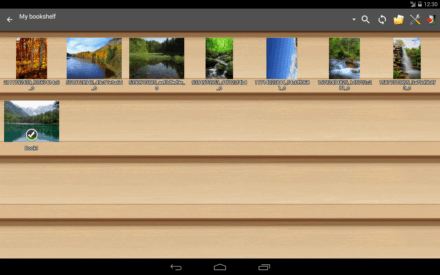
In Perfect Viewer, there is a "bookshelf" display (need to locate the path first in settings). I prefer to use this view as it shows what are the available mangas that is available on the SD card. 

Comments

Popular posts from this blog

MX Linux Fluxbox Review - For Low-End Laptops

  MX Linux logo from https://linuxiac.com/mx-linux/      Recently I have successfully installed MX Linux Fluxbox on my Acer Aspire One 725 (AO725) netbook. I initially wanted to install Bodhi Linux onto my AO725 netbook, but failed. Finally I tried MX Linux Fluxbox, after trying Anti-X linux and some other ultra-lightweight Linux. MX Linux Fluxbox is suppose to be a lightweight Linux for low-powered laptops such as netbooks or very old laptops. Upon bootup, it only takes 337MB of RAM (438MB for Thinkpad X200) before you load any apps. With 4GB RAM, it is still a lot of RAM for for most apps, like the browser but the CPU utilization is close to 100% after running a Chromium broswer and DeadBeef music player. Things likely be slow... after this point from my observation but I have not tried to do anything more than those common things that I usually need to do.      Since I managed to install MX Linux Fluxbox, I initially did not bother to use the A...

Linux-DesktopEnv: RAM Usage Comparison For Sparky Linux LxQT and Xfce and Q40S MATE Desktop Environment

  Today I did a test on RAM usage for the following desktop environments (DE) using VirtualBox to determine their RAM usage: MATE DE with Q4OS 4.7 Sparky Linux 6.2 LXQt Sparky Linux 6.2 Xfce      The main reason is for me to decide which desktop environment I want to use for my Lenovo Thinkpad X200. I have tried other desktop environments: Enlightenment with SparkyLinux MininumGUI  Trinity with Q4OS Bodhi Linux with a customized Enlightenment DE      The main issue with Enlightenment with SparkyLinux is that it does not work well with autologin. Sometimes it gets kicked out and you have to login again. I suspect is the windows manager issue but I cannot find the solution for this. Trinity has an issue with using jpg wallpaper so it is a turn-off as I don't want default wallpapers. The customized Enlightenment desktop in Bodhi Linux has limited themes but is still acceptable but I want to look for the best for my Thinkpad X200.     ...

How To Connect To Singapore Free Public WiFi - Wireless@SG For Non-SIM Operating System

Image from: https://play.google.com/store/apps/details/Wireless_SGx?id=sg.gov.imda.wsgapp2_android&hl=en-SG      All the while Singapore's free public WiFi - Wireless@SG only supports Android and IOS devices with SIM cards, Windows and Mac operating system. Any other operating system such as Chromebook, Linux or devices without SIM are faced with an issue of unable to connect to this public WiFi network. However, recently I noticed that I am unable to download the Wireless@SGx app for my new phone and started looking at Infocomm Media Development Authority (IMDA) website for Wireless@SG. The link is below: IMDA website for Wireless@SG     There are now more options to connect to Wireless@SG now. To allow more platforms/operating system, especially Chromebook and Linux to connect to Wireless@SG, choose the " Android non-SIM Setup ".  Choose the URL or QR code to get to the registering page. Android non-SIM Setup Once at the website. Choose the "Devi...